


Planmeca Emerald Intraoral Scanner CADCAM Unit + 3 Scanner tips
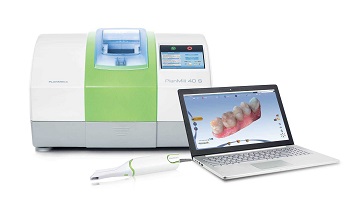
The Planmeca Emerald™ Next-Gen Intraoral Scanner is an ultra-lightweight, ergonomically designed digital scanner that quickly delivers images with superior accuracy and detail. A streamlined, compact design provides clinicians with a comfortable feel and superior control while capturing images. Deliberately designed for increased patient safety, autoclavable seamless scanner tips prevent cross-infection while encouraging continuous scanning.
By using a multi-color laser based system, Planmeca Emerald produces images with a vibrant color palette for realistic digital impressions that allow dentists to distinguish between hard and soft tissue. Built on an open system platform, Planmeca Emerald seamlessly integrates with other systems making collaboration with labs worry-free. With Planmeca Emerald, scanning is never complicated. So simple, it’s brilliant.
Excellent usability and workflow:
•Ergonomic design – the perfect balance of size & weight
•Superior speed & accuracy
•Fully integrated color scanning for natural colors
•Simple plug-and-play solution –scan at multiple workstations
•Autoclavable tip & seamless design for impeccable infection control
•Active anti-fog feature on the tip of the scanner
•USB-3 connection
•Open STL format
Relocating the Laptop and/or Scanner
The laptop can be unplugged and moved as needed. The software does not need to be shut down. The scanner can
be disconnected at any time.
System Information and Upgrades
Software and Hardware
System software and hardware upgrades are initiated through Planmeca only. No software or hardware should be
added or deleted to/from the Planmeca systems without prior approval of Planmeca. Doing so may result in damage
to the system and will void the product warranty.
(After disinfection if scanning intraorally. See insert with scanning tips for
further details.)
1 Grasp the body of the scanner with one hand.
2 Use the other hand to slide the scanning tip onto the scanner as
shown. Line the mark on the tip up to the smaller mark on the
scanner body. Twist the scanner tip to lock it into place. Ensure the
marks on the tip and the base are aligned.



There are no reviews yet.